Prove to an auditor that supplier certificates were reviewed
Marking a certificate as reviewed in Certly records who read it and when, and that sign-off shows in the certificate's row on the audit-ready dashboard and in the PDF you hand the auditor. Automation removes the step that used to be your proof of review, opening the document to copy its printed date into a spreadsheet, so Certly records the review itself instead.
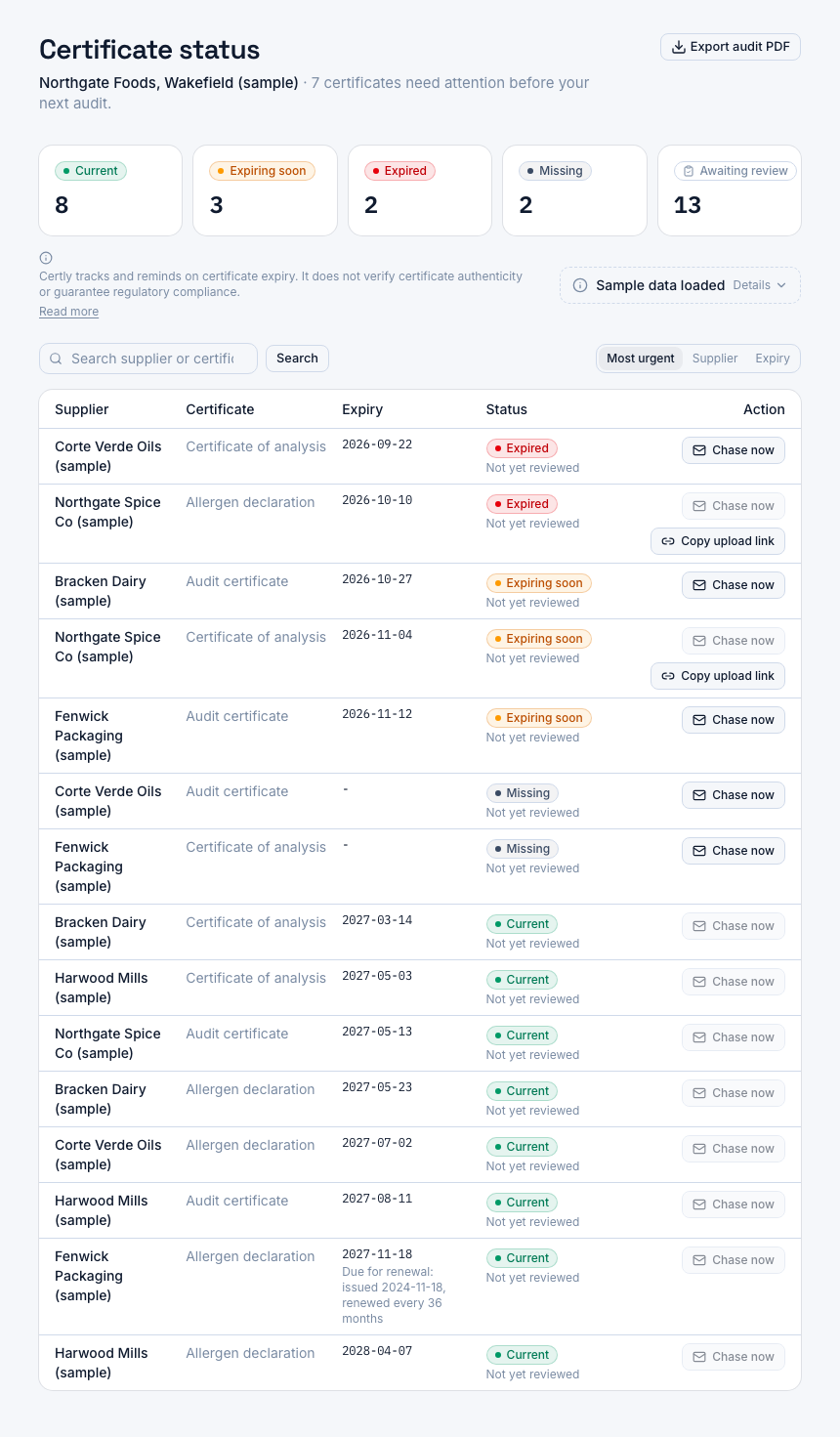
A screenshot of Certly, showing sample data. Nothing in it is a promise: what the product does is what this page says in words.
The proof of review that automation removes
If your supplier tracker is a spreadsheet, you already hold evidence that someone read each document, and you probably did not set out to create it. To fill the cell you had to open the PDF, find the printed issue or expiry date, check the scope looked right for what you buy, and type the date in. The typed date was the by-product of a real review by a named person.
Collect the documents and compute the dates automatically, and that by-product is gone. A row reads current because a date exists, not because anyone read the certificate behind it. On audit day the question is rarely only whether the document is in date. It is who looked at it, and when.
That is an awkward question to answer from a folder of PDFs and an email thread. An upload timestamp says when the file arrived, not when a person read it. A coloured cell says a date was entered, not who entered it, and a shared spreadsheet rarely says which of two people typed over the other.
Certly records the review against the certificate itself, as a stamp carrying the person and the moment, and then shows that stamp in the two places an auditor looks: the certificate row on screen, and the exported page in their hands.
How review sign-off works in Certly
- Open the certificate from its row
The audit-ready dashboard is a single screen showing every supplier's certificate slots as current, expiring soon, expired or missing, across the certificate types you set for each supplier, such as the allergen declaration, the CoA and the audit certificate. You open the document from the row you are working through, the same way you would have opened it to copy a date into the spreadsheet.
- Mark it as reviewed
Marking the certificate as reviewed records the review against that certificate: the person who did it and the time they did it. It stops being something you remember doing and becomes a stored fact on the record.
- The row carries the sign-off
Each certificate row on the audit dashboard shows the review sign-off beside its status, so a document that arrived and was filed but never read is visible as exactly that, during your own preparation rather than in front of an auditor.
- Export the same view for the auditor
The PDF export of the dashboard carries the review sign-off alongside the status for every supplier and certificate type, with the same four status labels and badges as the screen, so the page you hand over says what the screen you work from says.
What the sign-off gives you on audit day
A name and a time, not a recollection
When the auditor asks who checked the allergen declaration, the answer sits on the row and on the export rather than in your memory or in a cell nobody can attribute to a person.
Unreviewed documents are visible early
A certificate with no sign-off reads as unreviewed on the same screen you use to see expiring and missing documents, so the gap surfaces while you still have time to open the file.
Screen and paper agree
The four statuses and the review sign-off appear in the dashboard and in its PDF export with the same labels and badges, so nothing you say in the audit room contradicts the document on the table.
The trail survives the renewal
Certly keeps expired certificates and the versions a renewal replaced for as long as your account is open, because that history is what an auditor asks for when the question is about a past date.
The review belongs to an account
People sign in to Certly with an email address and password, so a sign-off names the account that made it rather than whoever last had the shared file open.
What the sign-off answers, and what it does not
It answers one question precisely
Who reviewed this certificate, and when. That is what the stamp carries, on the row and on the exported page, for every certificate slot across every supplier on the one screen.
It does not answer the others
It does not say the certificate is genuine, that its scope covers the material you actually buy, or that a certificate issued against a different scheme than the one you asked for is acceptable. Those judgements stay with QA, and checking a certificate against the issuing body's own public directory stays a manual step you take.
Certly's dashboard and its PDF export both carry a short standing line stating that the product tracks certificates and reminds you about them, and that it does not verify certificate authenticity or guarantee regulatory compliance. That line is on the page the auditor reads as well as the screen you work from, deliberately, because it is the honest description of what the record is.
Where review sign-off sits in the rest of the trail
The sign-off is one column of a wider record, and three neighbouring pages in this section cover the rest of it.
- For what the exported page contains, column by column, read the page on exporting the certificate status view as a PDF.
- For the questions an auditor tends to ask about that page, and the limits of it, read the FAQ on handing the auditor the PDF.
- For the superseded document an auditor asks for by date, read the page on keeping superseded certificate versions.
- For a document finding already raised against you, read the page on closing out a supplier document non-conformance with dated evidence.
Status and sign-off stay separate facts. Status is computed from the expiry date on the document, with alerts at 90, 60 and 30 days before it, and a review stamp does not change it. That separation is the point: the row tells the auditor whether the certificate is in date, and the sign-off tells them a person on your team opened it.
Questions
Does a reviewed stamp mean Certly checked the certificate?
No. The stamp records only that a person on your account opened the document and marked it reviewed. Certly tracks certificates and reminds you when they are due; the judgement about the document itself stays with QA, which is what the standing line on the dashboard and on the PDF export says.
Who does the sign-off name?
The person who marked it. People sign in to Certly with an email address and password, so the review belongs to a named account rather than to a cell in a shared spreadsheet that two people can overwrite.
Does the review show in the PDF the auditor reads?
Yes. The review sign-off appears in each certificate row on the audit-ready dashboard and in the PDF export of that dashboard, next to the same current, expiring soon, expired or missing status, with the same labels and badges.
What happens when a renewal arrives?
A renewal is a new document, so read it and mark it reviewed in its turn. The version it replaced is kept rather than deleted, so the question about which certificate was valid on a date last year still has an answer.
Does marking a certificate reviewed change its status?
No. Status comes from the expiry date held against the certificate, with alert thresholds at 90, 60 and 30 days before it. A review stamp on an expired row does not make the row current; the two are separate facts shown side by side.
Which plan includes the review sign-off and the audit PDF?
The audit-ready dashboard and its PDF export for auditors are in Starter, at £149 a month for one site and up to 50 suppliers. Professional is £249 a month for up to 200 suppliers, Unlimited is £399 a month with no supplier cap, and every plan starts with a 14-day free trial. Buying a year up front costs 15% less than paying monthly.
Can more than one person in QA sign off?
Yes. Each review records the person who made it, so the sign-off on one supplier's audit certificate and on another's CoA can belong to different people. Professional is the plan written for a single plant with up to 200 suppliers and more than one person in QA, and Unlimited includes everything in Professional.
How long is the review record kept?
Everything is kept while your account is open, expired certificates, superseded versions and chase history included, because that trail is what an auditor asks for. Deleting your account from Settings removes it all at once, and the same screen downloads a JSON file of your data first.