Bulk export supplier certificates for an auditor
On audit day the auditor asks for the certificates themselves, not a summary of them, and in a folder or a one-file-at-a-time system that means opening each supplier in turn while the auditor waits. Certly gives you one audit pack download, a ZIP of the certificate documents on file, sitting beside the PDF export of the certificate status dashboard.
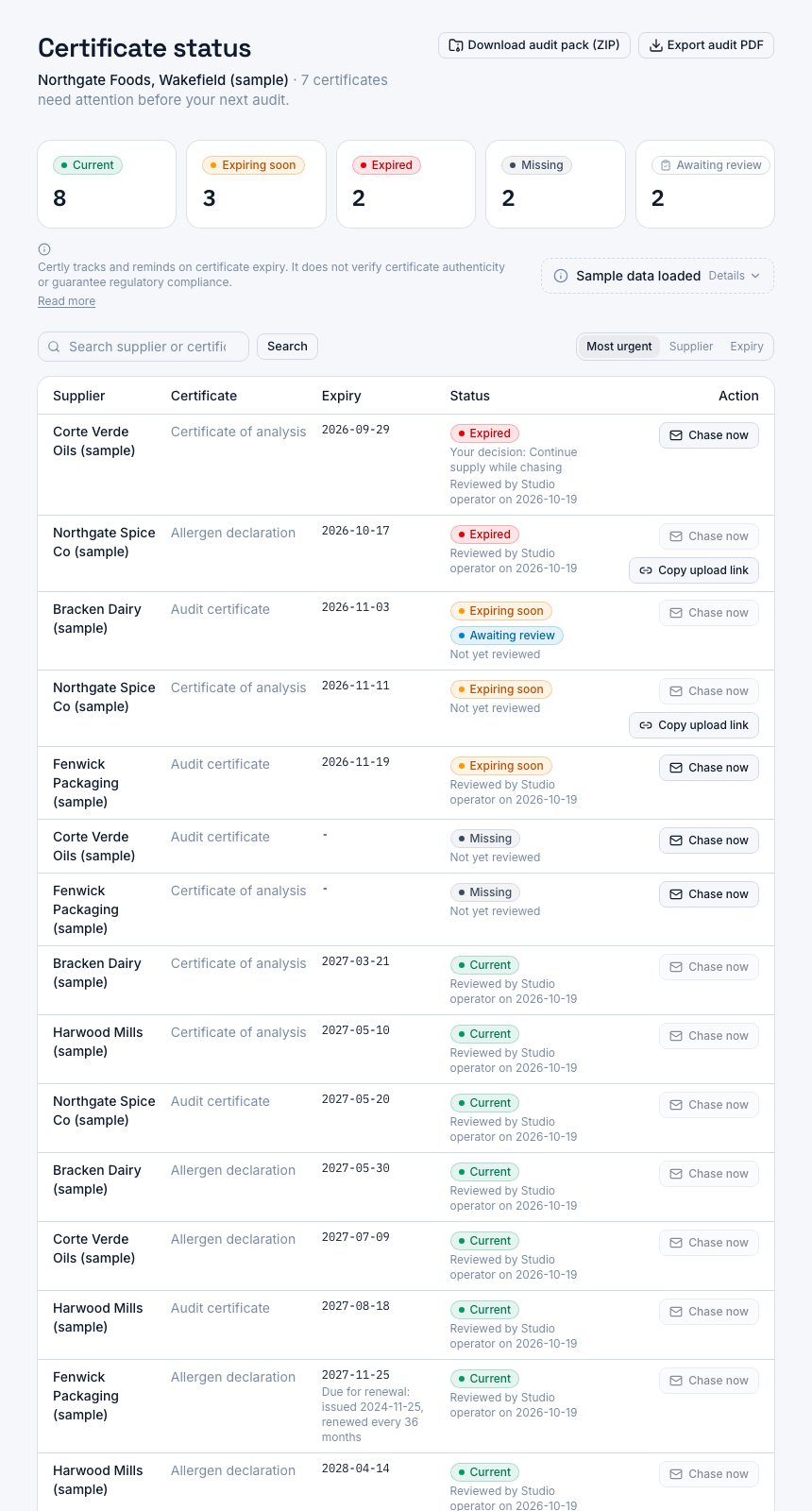
A screenshot of Certly, showing sample data. Nothing in it is a promise: what the product does is what this page says in words.
Opening suppliers one by one while the auditor waits
An auditor at the desk rarely wants your tracker. They want the allergen declaration for the supplier they just picked off the approved list, then the audit certificate for the next one, then the CoA behind the ingredient they have been following through the plant.
In a folder and spreadsheet setup that means one supplier at a time: find the folder, find the current file, read the date on the face of the document, put it somewhere the auditor can see it. In a lot of certificate systems it means the same thing with more clicks, because documents are held one per record and come out one per download. Not being able to take more than one document out at once is the ordinary reason teams start asking for a bulk export at all.
The cost is not only the clicks. It is that the assembling happens while someone is waiting, which is the worst possible moment to find out that the file you hold for a supplier is last year's version, or that the slot was never filled. An audit pack download moves that work to a quiet afternoon the week before, when a gap is still something you can chase rather than something an auditor writes down.
How the audit pack download works
- The documents are already in one place
Certificates reach Certly two ways: the QA team uploads them against a supplier and a certificate type, or the supplier uploads their own through a single-use, expiring link that needs no login. Whatever is on file is what the pack contains.
- Open the certificate status dashboard
One screen shows every supplier and every required certificate type in four states: current, expiring soon, expired or missing. This is the screen you check before an audit and the screen the exports are taken from.
- Take the audit pack as one ZIP
The audit pack download sits beside the PDF export on that same screen. One click builds a ZIP of the certificate documents on file for your site, so you are not downloading supplier by supplier.
- Hand over the pack and the status PDF together
The ZIP is the evidence, the PDF export of the dashboard is the index that says what state each certificate was in when you ran it. Auditors tend to want both, and both come from the same screen.
What the pack changes on audit day
One download, not one per supplier
A plant with fifty approved suppliers and three required certificate types has up to a hundred and fifty documents behind it. The pack is a single action regardless of how many that is.
The documents, not a description of them
The PDF export tells an auditor what status each certificate is in. The ZIP gives them the actual scans, which is what they open when they want to read a certificate number or an expiry date off the face of it.
Built from the same records as the board
The pack and the status dashboard read the same certificate records, so the files you hand over are the ones behind the statuses you were just looking at, as of the moment you ran the download.
Prepared early, not in the room
Because the pack takes one click, you can run it the week before and open the files yourself. Anything wrong is then a chase email, not a finding written up while you look for a folder.
Which export answers which request
| What the auditor asks for | Which export answers it |
|---|---|
| Show me the status of every required certificate | The PDF export of the certificate status dashboard, with the four states per supplier |
| Let me open the certificate for this supplier | The audit pack ZIP, which holds the certificate documents on file |
| Give me something I can keep with my audit notes | Both, downloaded from the same screen and handed over together |
What to check before you hand the pack over
The pack reflects the certificate records as they stand. That makes three checks worth doing first, and all three are on the status dashboard rather than inside the ZIP.
- Missing rows are missing files. A supplier with a required certificate type and no document uploaded has nothing in the pack. The dashboard names those rows as missing so you know before you download.
- Expired rows still appear. An expired certificate is evidence of a date, not of nothing. Leaving it in the pack and knowing it is expired is a stronger position than handing over a pack with a hole in it and no explanation.
- Expiring soon is a chase, not a problem. Alerts at ninety, sixty and thirty days before expiry exist so renewals land before audit week, not during it.
If you are preparing for a recertification or a customer document request, the use case pages in this section walk through the order to work in. The PDF export has its own page explaining exactly what that document shows and what it does not, and there is a separate page on how superseded versions are kept when a supplier sends a renewal.
Questions
What is in the audit pack ZIP?
The certificate documents on file for your site, downloaded together as one archive. Certly stores certificate uploads as PDF, PNG or JPEG, so that is what an auditor opens from the pack.
Does the pack include the status report as well?
The status view is a separate download: a PDF export of the certificate status dashboard, taken from the same screen as the pack. Most QA managers hand over both, the PDF as the index and the ZIP as the documents.
Does the auditor need a Certly account?
No. People who work in Certly sign in with an email address and password; an auditor does not sign in at all. You download the pack and the PDF and share them the way your audit normally takes evidence.
Can I take the pack during the audit rather than before?
You can, it is one action from the dashboard. It is still worth running it a week earlier, because the pack shows you what you actually hold while there is time to chase a supplier for anything that is expired or missing.
Does exporting the pack prove our suppliers are approved?
No. It proves what documents you hold and when they expire, which is the evidence trail an auditor asks to see. Certly is a certificate tracking and reminder tool: it does not verify certificate authenticity or guarantee that your plant meets a scheme's requirements.
Which plan do I need for the audit-ready exports?
Plans start at Starter, £149 a month for one site and up to 50 suppliers, and the audit-ready dashboard and PDF export for auditors are included from Starter upward. Professional is £249 a month for up to 200 suppliers, Unlimited is £399 a month with no supplier cap, and every plan has a 14-day free trial.
What happens to an old certificate when a supplier sends a renewal?
The version it replaced is kept rather than overwritten, so an auditor asking which document was valid on a past date can be answered. There is a separate page in this section on certificate version history.