Supplier sent the wrong certificate: request a correction
A supplier finally answers the chase, uploads a document, and it is the wrong one: an IFS certificate where you asked for BRCGS, or a scan that expired in March. In Certly that upload waits as awaiting review until someone in QA looks at it, and when it is wrong you send it back with a written reason that is emailed to the supplier contact, without restarting the chase sequence from step one.
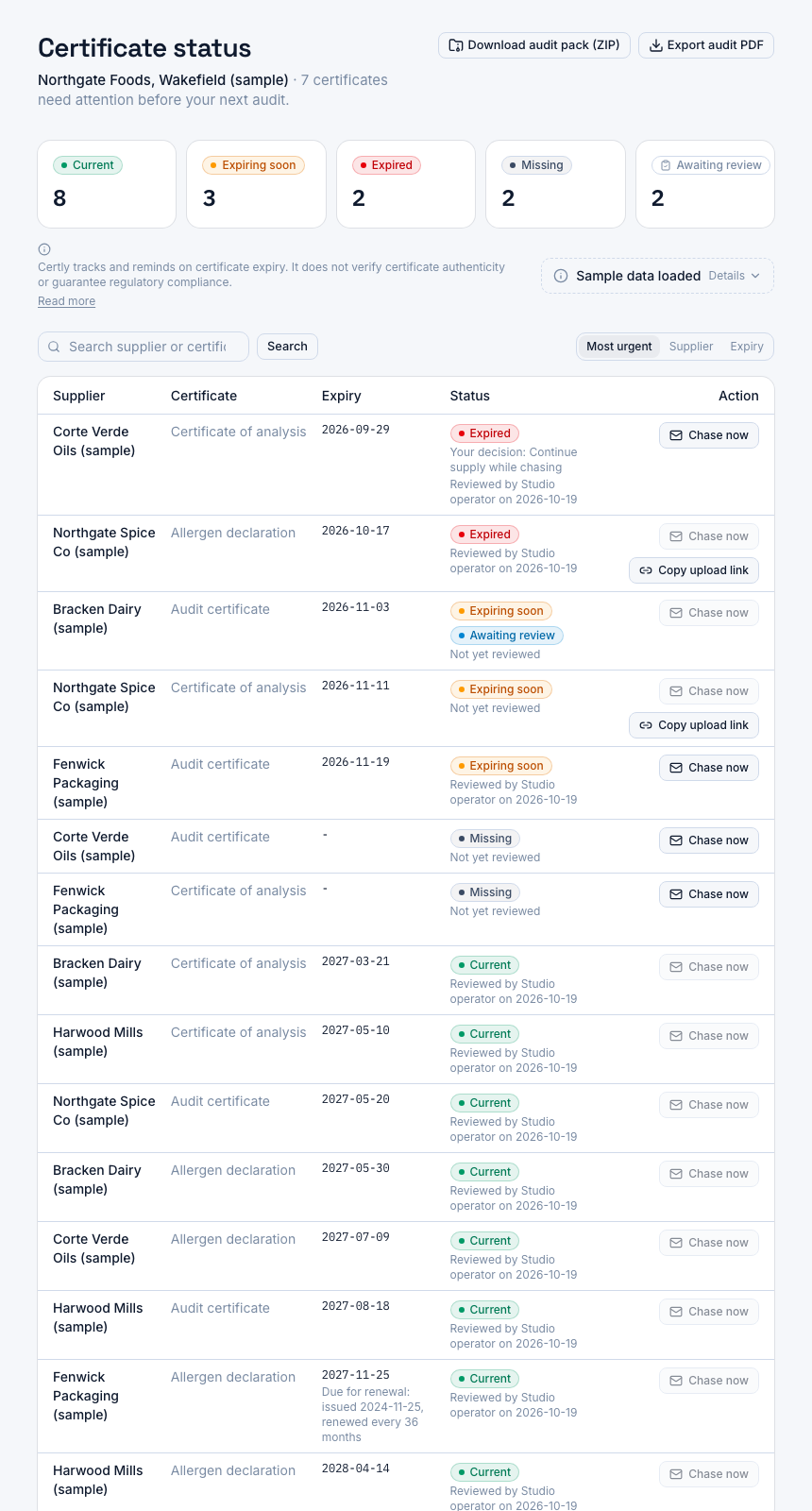
A screenshot of Certly, showing sample data. Nothing in it is a promise: what the product does is what this page says in words.
A wrong document counts as on file until the auditor opens it
The failure mode is not the supplier who ignores you. It is the supplier who replies. A file arrives, the reminders stop because something was received, and the certificate slot now shows a document against it. Months later an auditor asks for the third-party audit certificate for that site and you find an IFS certificate where the specification says BRCGS, or a certificate for the group's other factory, or a document that ran out before the delivery it was meant to cover.
In a spreadsheet and a shared folder, nothing distinguishes "a document exists" from "a document has been checked". The date column gets filled from whatever was sent, because filling it is how you close the task. Any system that marks a slot current the moment a file lands has the same gap: the one person who would have spotted the wrong scheme never had to open the file.
The decision in front of you, then, is not whether to collect documents by email or by link. It is what happens in the gap between the upload arriving and a human in QA reading it, and what it costs you to say no to a document without going back to the start of the conversation.
The two things that usually go wrong
- The upload is treated as current before anyone reads it, so the wrong certificate is only ever caught by an auditor.
- Rejecting it means a fresh request written by hand, and the reminder schedule you had set up starts again as if the supplier had never replied.
How a correction request works in Certly
- The supplier uploads through the link in the chase email
Each chase email names the certificate it is asking for and carries a one-click upload link, and every send is logged against that supplier. The supplier does not create an account, and the document arrives tied to the right supplier and the right certificate type.
- The upload is held as awaiting review
A supplier self-upload does not make the slot current on its own. It sits as awaiting review until someone in QA acts on it, so nothing tells you a certificate is in hand merely because a file happens to exist.
- You open the document and check it against what you asked for
The scheme on the certificate, the issuing body, the site named on it, the printed issue and expiry dates. This is the step that was always your real proof of review, and it stays yours rather than being inferred from an upload timestamp.
- Accept it, and the slot stops waiting on you
Accepting clears the review and the certificate takes its place in the single-screen status view with everything else, tracked against its expiry like any other document on file.
- Or send it back with a reason, emailed to the contact
You write the reason in your own words, for example that this is an IFS certificate and the specification requires BRCGS, or that the certificate expired last month. Certly emails that reason to the supplier contact and the slot goes back to waiting for the document.
- The chase sequence carries on from where it was
Sending a document back does not reset the supplier to step one of the sequence. The chases already logged stay logged, and the reminders continue from the point the certificate had reached rather than starting over.
What this changes week to week
Awaiting review is a state you can work through
An upload that still needs a QA decision is held as awaiting review rather than counted as a certificate on file, so the documents that need opening are a list to work down rather than something to remember.
The reason reaches the person who sent the file
The correction request goes to the supplier contact you already hold, with your wording about what was wrong, rather than a generic reminder that reads as though nobody looked.
The chase record is per send
Chase emails are logged per send, so when an auditor asks how a lapsed certificate was pursued you can show what was sent and when.
The document you sent back is not lost
Everything is kept while your account is open, expired certificates and versions superseded by a renewal included, because that trail is what an auditor asks for.
What a useful reason says
The send-back reason is free text, and a specific one is the difference between a corrected document next week and three more wrong attempts. Suppliers' certificates are usually issued by a certification body, not by the person reading your email, so name exactly what has to change.
- The scheme, by name. "We need the BRCGS Food Safety certificate for this site; the attached is IFS Food."
- The site. Group certificates are common, and a certificate for another factory is not evidence for the one shipping to you.
- The dates. If the document has already expired, say so and say which version you need.
- The document type. A certificate of analysis for one batch is not an allergen declaration, and vice versa.
- What you will do next. A sentence saying the slot stays open until the correct document arrives sets the expectation without a second email.
What Certly does not decide for you
Certly tracks certificates and reminds suppliers about them. It does not read the document, does not judge whether a certificate is genuine, and does not guarantee regulatory compliance. That line sits on the dashboard and on the audit PDF export, because the accept or send back decision is a QA judgement and the product should not imply otherwise.
In practice that is the point of holding uploads as awaiting review. The product does the parts that are mechanical, collecting the file, naming the certificate, timing the reminders, logging the sends, and leaves the one part that needs your eyes to you. If you want to verify a third-party audit certificate against the scheme owner's public directory, you still do that yourself, and then accept or send it back.
Questions
A supplier sent an IFS certificate instead of BRC. How do I request a correction?
Open the upload while it is awaiting review, choose send back, and write the reason, for example that the specification requires a BRCGS certificate for that site. Certly emails the reason to the supplier contact and the certificate slot goes back to waiting for the document.
Does sending a certificate back restart the chase sequence?
No. That is the point of the action. The chases already logged stay logged and the sequence continues from where it had reached, so the supplier is not dropped back to a first reminder as though they had never replied.
Can a supplier upload the corrected document without creating an account?
Yes. Supplier uploads go through a single-use, expiring link sent to the contact by email, with no login and no password for them to manage.
Does an upload count as current before I review it?
No. A supplier self-upload is held as awaiting review until someone in QA accepts it or sends it back, so a file arriving does not quietly turn a slot into a certificate on file.
Does Certly check whether the certificate is the right one?
It does not. Certly tracks and reminds; it does not verify certificate authenticity or guarantee compliance, and it says so on the dashboard and on the audit PDF. The accept or send back decision is yours.
What happens to the document I sent back?
The record stays. Everything is kept while your account is open, including superseded versions and the chase history, because that trail is what an auditor asks for.
Which plan includes reviewing supplier uploads?
All of them. Starter is £149 a month for one site and up to 50 suppliers, Professional £249 for up to 200, Unlimited £399 with no supplier cap, each with a 14-day free trial, and annual billing saves 15%.
Can I write the wording a supplier sees?
Yes. The wording you use for your chase emails is yours to write rather than a fixed template, and the page on reading the exact chase email before a supplier ever gets it covers how that request reads.