Expired certificates: the record a risk decision rests on
If your QA programme says a risk assessment is carried out when a supplier document is not renewed before expiry, that assessment needs dated facts underneath it. Certly does not write the assessment or make the call, it keeps the record the call refers to: when the certificate expired, what the dashboard said, every chase that went to the supplier, and the document that was valid before.
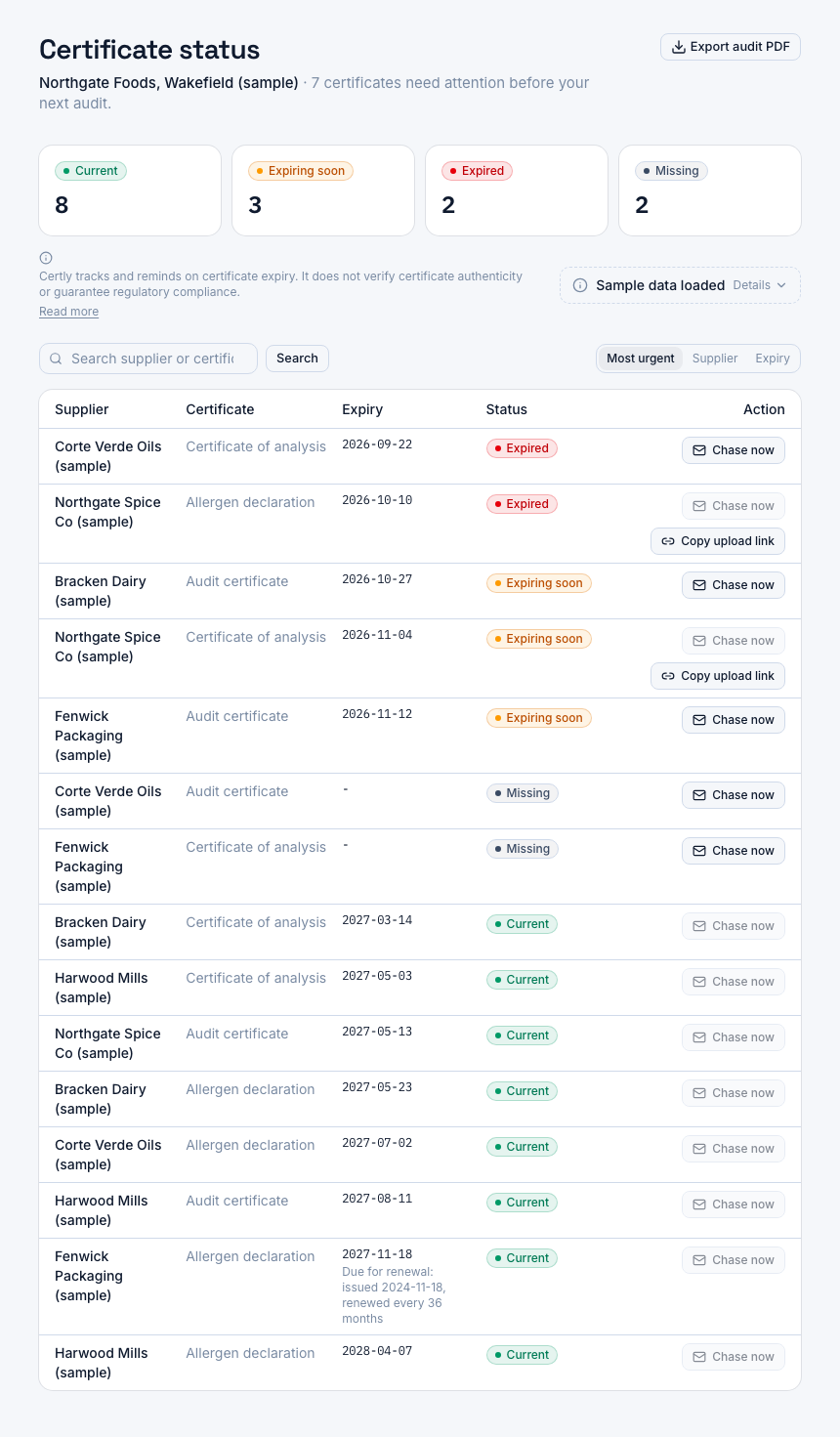
A screenshot of Certly, showing sample data. Nothing in it is a promise: what the product does is what this page says in words.
Why an expired row is where the decision starts
Certificate expiry is not always in your hands. The reminder goes out at 90 days, again at 60, again at 30, and the certification body still has not issued the new audit certificate, or the allergen declaration is sitting with someone who is on leave. The date passes, the row turns expired, and it stays expired until the document actually arrives.
The decision is then yours. Hold the material, keep working to the last valid certificate, ask the supplier for written confirmation that the re-audit is booked, or stop buying: that is a judgement for your team and your programme, not for software. What an auditor asks for is the evidence underneath it, that you knew, when you knew, and what was being done while you waited. QA practitioners trade this exact question with each other on the forums, what to do about a vendor certification that has lapsed with an audit coming.
Certly is a certificate tracking and reminder tool. It does not write your risk assessment and it does not decide anything for you. What it does is hold the dated facts that assessment refers to, in one place, for as long as your account is open: the expiry date on the document, the status it computes from that date, every chase that left for the supplier contact, and the version a renewal eventually replaced.
What Certly records while a certificate sits expired
- The expiry date, against a threshold you set
Your QA team uploads the certificate tied to a supplier and a certificate type, with its dates. Certly tracks expiry with alert thresholds at 90, 60 and 30 days before the date, configurable per certificate type, so the lapse was flagged well before it happened.
- The status, in one of four literal words
The audit-ready dashboard shows each supplier's certificates as current, expiring soon, expired or missing on a single screen. Expired reads expired until a document with a valid date is uploaded. There is a page in this section on what each of the four states means.
- Every chase that left, and its result
Automated email chase sequences go to the supplier contact for certificates approaching expiry and for ones already lapsed, logged per send, each carrying a one-click upload link the supplier uses without a login. So "we asked them" has dates on it rather than a recollection.
- The document the renewal replaced
When the new certificate finally arrives, the version it supersedes is kept rather than overwritten, along with expired certificates and chase history, while your account is open. An auditor asking which declaration was valid last March has somewhere to look.
- A PDF the auditor can read
The dashboard exports to PDF for auditor review, carrying the standing line that the platform tracks and reminds and does not verify authenticity or guarantee compliance. The expired rows appear on it as expired.
What that record is worth on audit day
The lapse comes with dates attached
An expired row on its own invites one question. An expired row with its expiry date, the chases that went out, and the upload that eventually closed it answers most of what follows in the place the auditor is already looking.
Nothing is quietly made to look current
The four states stay literal. Certly will not show an expired certificate as current because there is a good reason for the delay, so the dashboard and its PDF export keep telling you which documents are actually in date.
Chasing is evidenced, not asserted
Each chase email is logged per send, so the trail shows what was actually sent to whom and when. The Professional plan adds the full chase history log per supplier.
It survives a handover
When the coordinator who held the spreadsheet moves on, the dates, the superseded versions and the chase history stay in the account rather than in their mailbox or a file on their laptop.
It is scoped to your plant
An account covers one site, and every supplier and certificate query is scoped to that site, so another plant's records are never in your view and yours are never in theirs.
Where the written decision itself lives
The risk assessment your scheme asks for is your team's document, in your team's words, judged against your own supplier approval programme. Certly holds the facts it cites, not the judgement: the certificate and its dates, the status on the day, the chase history, and the document that was valid before.
So in practice the assessment you write under your own document control refers out to the Certly record, naming the supplier, the certificate type and the expiry date, and the auditor can be shown both: your written decision, and the dashboard and PDF export that show the lapse was tracked and chased rather than missed. If you stop buying from that supplier altogether, archiving it keeps its certificate records and stops its reminders.
Two neighbouring pages are worth reading alongside this one: how an auditor tends to read an expired certificate on file, and what each of the four certificate states actually means. There is also a page on documents with no printed expiry date at all, the allergen declarations and vendor questionnaires that need a renewal period rather than a date, and one on the chase log itself.
Who can see the record, and what it costs
People sign in with an email address and a password, and every supplier and certificate query is scoped to your site. Deleting the account removes sites, suppliers, certificate documents, chase history, settings and sign-in details at once, and the same screen downloads a JSON file of your data first.
Starter is £149 a month for up to 50 suppliers on one site. Professional is £249 a month for up to 200, with the full chase history log per supplier, which is the plan to look at when more than one person in QA shares the chasing. Unlimited is £399 a month with no cap on suppliers and the option to send chases from your own connected mailbox. Every plan starts with a 14-day free trial, with no card at the start of it, which is long enough to load your real supplier list and see what the dashboard says about the documents you already hold.
Questions
Does Certly write the risk assessment for me?
No. Certly tracks certificate dates, reminds suppliers and keeps the record of what happened. Judging the risk and writing it up against your supplier approval programme is your team's work, and the record is the evidence it refers to.
Can an expired certificate ever show as current?
The status is one of four literal states, current, expiring soon, expired or missing, computed from the expiry date on the document. An expired certificate reads expired on the dashboard and in the PDF export until a document with a valid date is uploaded.
Do the chase emails stop once a certificate is already expired?
No. The automated chase sequences cover certificates approaching expiry and ones already lapsed, each send logged, each with a one-click upload link the supplier can use without a login.
What can I actually hand to an auditor?
The audit-ready dashboard exports to PDF for auditor review, showing each supplier's certificates in their four states, and carrying the line stating that Certly tracks and reminds and does not verify authenticity or guarantee compliance.
If the renewal eventually arrives, is the expired version still there?
Yes. Expired certificates, versions replaced by a renewal and chase history are kept while your account is open, because that trail is what an auditor asks for. A renewal never deletes the document it replaces.
Who in my team can see this record?
Anyone signed in to your site's account, with an email address and a password. Data is scoped to your site on every query, so your plant's certificate records are only ever visible inside your plant's account.
What happens to the record if I stop buying from that supplier?
Archiving the supplier keeps its certificate records and stops its reminders, so the history stays available. Everything is removed only if you delete the account, which clears sites, suppliers, documents, chase history and sign-in details at once.