Supplier certificates by expiry status, on one screen
If you want supplier certificates set out by expiry status, that is what Certly's audit-ready dashboard is: one screen carrying a row for every certificate type you require from every supplier, with one state against each, current, expiring soon, expired or missing.
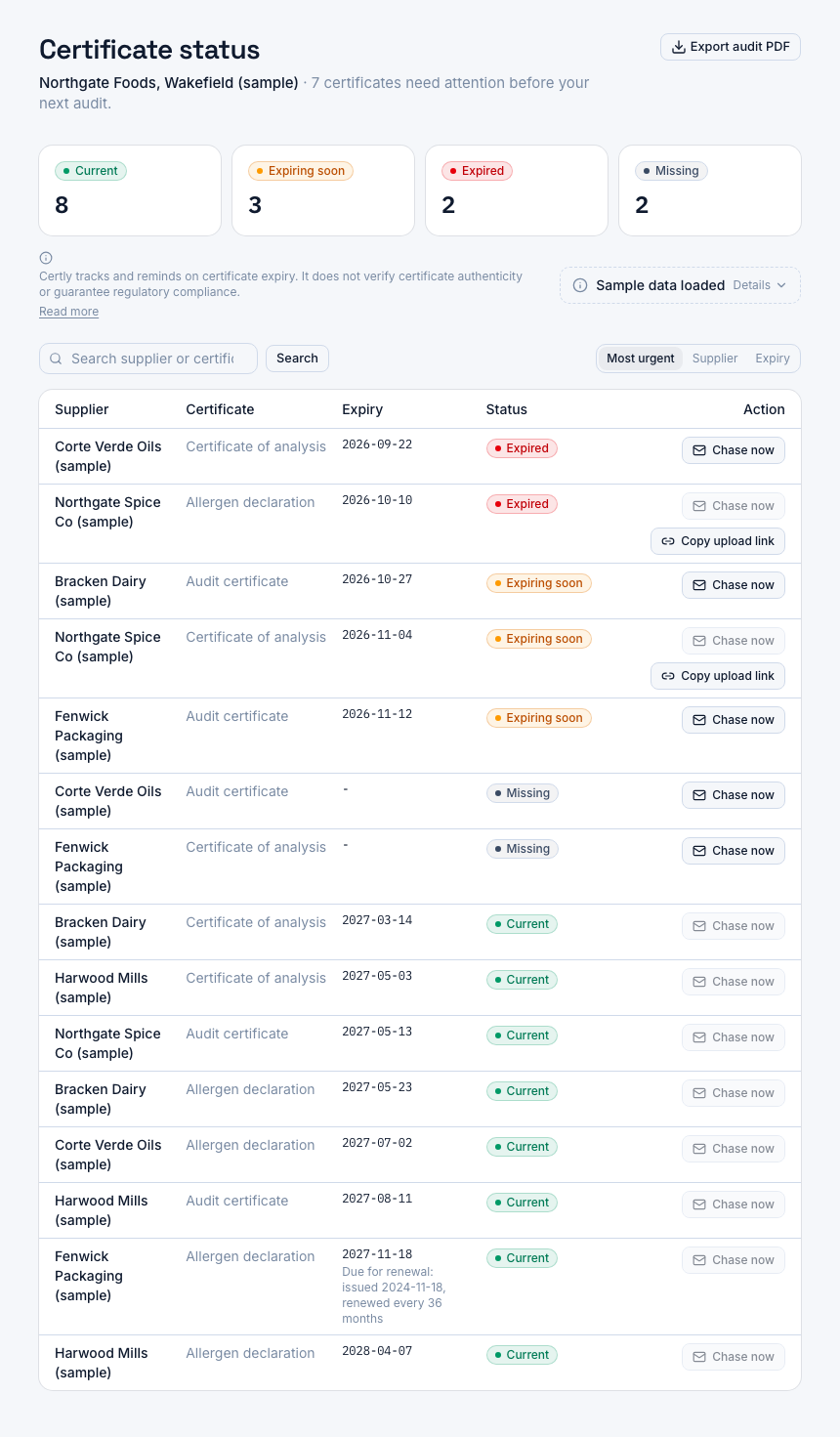
A screenshot of Certly, showing sample data. Nothing in it is a promise: what the product does is what this page says in words.
One row for every certificate, one state against each
The audit-ready dashboard is a single screen. It carries a row for every certificate type you have marked as required against every supplier you have added, and one of four states sits against each row: current, expiring soon, expired or missing. That is the honest shape of the job, your whole approved supplier list with a state per slot, rather than a tidier version of it.
Where each state comes from
Nobody types a status. When a certificate goes on file, by your QA team or by the supplier, the issue and expiry dates are recorded with it, and the state is computed from those dates against your alert thresholds. A document whose recorded expiry date has not passed reads current. Once that date falls inside one of your thresholds, 90, 60 and 30 days as standard, it reads expiring soon. Past the date it reads expired. A certificate type you require with no document on file at all reads missing.
That last state is the one a spreadsheet handles worst. An empty cell is easy to read past, and a blank column is nobody's job. Here the gap is a row in its own right, in the same place as everything else, which is where a lapsed audit certificate or an allergen declaration that never arrived stops being invisible.
A long board, and what moves it
On a deeper supplier base the screen is long. A plant on Professional tracks up to 200 suppliers, and three required types each puts 600 slots behind one view. The product does not ask you to read all of that every Monday to find what has moved. The expiry alerts at your thresholds and the automated chase sequence do that work, reaching the supplier contact with a one-click upload link while there is still runway, and the PDF export turns the same screen into the document you hand an auditor. The board is the record you confirm against; the reminders are what keep it current.
What each of the four states means to an auditor, and how to read a board before a recertification, is set out on the supplier document pack page in this pillar. This page is about where the states come from.
How the four states get onto one screen
- Name what each supplier owes you
The supplier database holds company and contact details and the certificate types you require from that supplier: allergen declaration, certificate of analysis, audit certificate. Each required type becomes a slot on the board for that supplier, whether or not a document has arrived yet, so a gap has somewhere to show.
- Get the document on file with its dates
Your QA team uploads a certificate against the supplier and the certificate type, or the supplier uploads it themselves through a single-use, expiring signed link sent to their email, with no account to create. The issue and expiry dates recorded on upload are what every state is computed from.
- Decide what expiring soon means
Certly alerts at 90, 60 and 30 days before expiry. On the alert settings screen you can add, edit or remove a threshold per certificate type or set a plant-wide default, because an annual audit certificate and a batch certificate of analysis do not deserve the same runway.
- Read the board
The dashboard shows every supplier's required certificate types with the state against each, and the two-sentence disclaimer about what the product does and does not do sits next to the status badges rather than in a wall of small print.
- Act from the row
Chase now sends a one-off chase email to that supplier contact from the row and logs it like any other send, while the automated sequence keeps working on certificates approaching expiry or already lapsed, each message carrying a one-click upload link.
- Hand the same screen to the auditor
The PDF export of the status view uses the identical labels, colours and icons as the dashboard and the supplier row, and repeats the same two-sentence disclaimer near the top, so the auditor's copy and your screen cannot disagree.
What each status means and what it asks of you
| Status | What puts a row in this state | The next move |
|---|---|---|
| Expired | A document is on file and its recorded expiry date has passed | Chase now from the row, and let the chase log hold the dated record of what you sent |
| Missing | A certificate type you require with no document on file at all | Get the first document in through the supplier's no-login upload link |
| Expiring soon | The recorded expiry date falls inside one of your alert thresholds, 90, 60 or 30 days, or whatever you have set for that type | Leave the automated sequence to work on it, and watch the row flip to current when the renewal lands |
| Current | A document is on file and its recorded expiry date has not passed | Nothing, and it reads the same way in the PDF you hand to an auditor |
What the single screen changes about the work
Missing is a state, not an empty cell
A required certificate type with no document at all holds a row in its own state, so the supplier who has never sent anything sits on the same screen as the supplier whose audit certificate lapsed last week.
Expiring soon means what you decided
The board works to your thresholds, 90, 60 and 30 days as standard, editable per certificate type or as a plant-wide default, so the runway on an annual audit certificate is not the runway on a batch document.
Every row computed the same way
States come from the recorded issue and expiry dates rather than from anyone's memory of what the colour was last month, so two people in QA read the same board the same way.
The chase sits on the row
Chase now is on the supplier's row and on their own page, so the supplier holding you up gets an email with a one-click upload link, and every send is logged.
The auditor's copy matches the screen
The PDF export carries the same four status labels, colours and icons as the dashboard, and the same disclaimer, so nothing you hand over contradicts what you have been working from.
Only your plant's rows
Certly is single-site and single-tenant per plant, and every supplier and certificate query is scoped to your plant, so the board can only ever show your suppliers and your certificates.
Where the status board sits next to the rest of the pillar
Holding the four states on one screen is one job. The pages around it cover the others, and they are deliberately separate.
- The PDF export page covers the document you hand an auditor, which carries the same four status labels, colours and disclaimer as the screen.
- Superseded certificate versions are their own subject, because "show me the declaration that was valid last March" is a different question from "is this one current".
- If you are clearing the board before a recertification, start from the supplier document pack page, and the unannounced audit preparation page covers keeping it in that state the rest of the year.
- When a row has already turned into a finding, the page on closing out a supplier document non-conformance with dated evidence picks up from there.
What it costs to put your list behind the screen
Every plan includes the supplier database, certificate upload and storage, expiry alerts at 90, 60 and 30 days, automated chase emails, no-login supplier upload links, the audit-ready dashboard and the PDF export. What changes is how many suppliers sit behind the screen: Starter is £149 a month for a single site tracking up to 50 suppliers, Professional is £249 a month for up to 200 and adds the full chase history log per supplier, and Unlimited is £399 a month with no cap on suppliers and chases sent from your own connected mailbox. Each plan starts with a 14-day free trial.
Questions
What are the four certificate statuses?
Current, expiring soon, expired and missing. Current and expired come from the recorded expiry date against today, expiring soon means that date falls inside one of your alert thresholds, and missing means a certificate type you require has no document on file at all.
What happens to a certificate type I require but have never received?
It holds a row on the dashboard in the missing state against that supplier. If you do not require a certificate of analysis from a packaging supplier, there is no slot and no row, so the board follows the requirements you set on each supplier record.
What decides whether a row reads expiring soon rather than current?
Your alert thresholds. Certly works to 90, 60 and 30 days before expiry, and the alert settings screen lets you add, edit or remove a threshold per certificate type or set a plant-wide default, so the runway is the one you chose for that type of document.
Can I see one supplier's certificates on their own?
Yes. Each supplier has their own record, listing the certificate types you require from them with the state against each, and the chase history for that supplier alongside it.
Does the auditor's PDF show the same statuses as the screen?
Yes. The PDF export of the status view uses the identical four status labels, colours and icons as the dashboard and the supplier row, and carries the same two-sentence disclaimer near the top. The export page in this pillar sets out what it includes.
Can another plant's suppliers appear on my dashboard?
No. Certly is single-site and single-tenant per plant, and every supplier and certificate query is scoped to your plant, so the board returns your own rows only.
How many suppliers can one site track?
Starter covers up to 50 suppliers at £149 a month, Professional up to 200 at £249 a month, and Unlimited has no cap at £399 a month. All three are a single site and all three include a 14-day free trial.
If nothing on the board reads expired, are we compliant?
It means the expiry dates you have recorded are in order as of today. Certly tracks and reminds; it does not verify that a certificate is genuine and it does not guarantee that your plant meets a standard. That judgement stays with you and your auditor, and the product states it on the dashboard and in the export.